


Businesses in Brighouse, West Yorkshire, rely on digital information to manage daily operations, customer records, financial documents, emails, and important business files. Losing this information because of hardware failure, cyberattacks, accidental deletion, or unexpected disasters can lead to costly downtime and disruption.
The 3-2-1 backup rule is a simple data protection strategy that helps businesses reduce the risk of data loss and improve recovery. Whether you run a small office or a growing company, having reliable Business data backup Brighouse can help protect your valuable information.
At Brighouse Computer Centre, we understand the importance of dependable IT systems and data protection. In this guide, we explain how the 3-2-1 backup rule works, why businesses need it, and how the right Data Backup Solutions Brighouse can help protect your organisation.
What Is the 3-2-1 Backup Rule?
The 3-2-1 backup rule recommends keeping three copies of your data, storing them across two different types of storage media, and keeping at least one copy off-site.
This strategy helps reduce the risk of losing all your information if a device fails, a cyberattack occurs, or an incident affects your business premises.
Here is how it works:
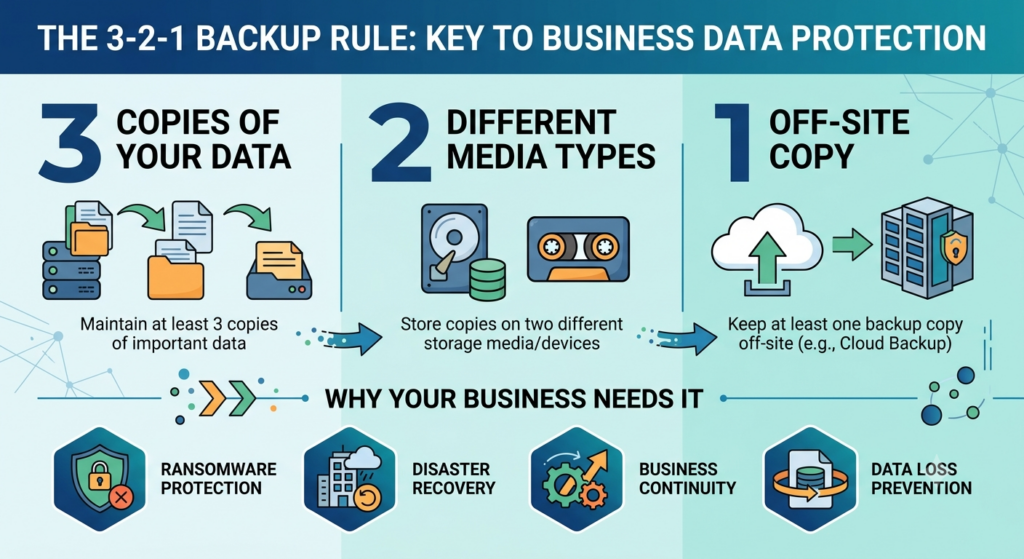
- 3 Copies of Your Data: Keep your original data and at least two additional copies.
- 2 Different Storage Types: Use two different types of storage to reduce the risk of a single point of failure.
- 1 Off-Site Copy: Store at least one backup away from your main business location or in a suitably isolated cloud environment.
For businesses in Brighouse and the surrounding West Yorkshire area, this approach provides a practical foundation for protecting important business information.
Why Do Businesses in Brighouse Need the 3-2-1 Backup Rule?
Data loss can affect businesses of every size. From customer information to financial records, losing access to essential files can interrupt operations and damage customer confidence.
A reliable backup strategy can help businesses prepare for unexpected problems.
1. Protect Your Business Against Hardware Failure
Servers, laptops, hard drives, and storage devices can fail without warning. If your only copy of important files is stored on a failed device, recovering that information may be difficult.
Reliable IT backup solutions Brighouse help maintain additional copies of important files so your business can restore data when hardware problems occur.
2. Reduce the Risk of Ransomware and Cyberattacks
Ransomware can encrypt business files and prevent employees from accessing essential information. Secure backups can provide an alternative recovery option when systems are affected.
Businesses should protect backup copies with encryption, restricted access, offline or immutable storage where appropriate, and regular restoration testing.
3. Minimise Business Downtime
When important files or applications become unavailable, employees may be unable to complete essential tasks. A well-planned backup strategy helps businesses restore information and resume operations more efficiently.
Suitable disaster recovery solutions brighouse for business can help organisations establish recovery priorities and reduce the impact of unexpected IT incidents.
4. Recover Accidentally Deleted Files
Employees may accidentally delete documents, overwrite files, or make unwanted changes to important records.
Maintaining multiple backup copies can provide additional recovery options, particularly when backups retain earlier versions of files.
5. Protect Data During Unexpected Disasters
Fire, flooding, theft, and other incidents can damage business equipment and the data stored on it.
Keeping an off-site copy helps protect information if an incident affects your main workplace. Businesses should also document recovery procedures and test their ability to restore important systems.
How to Implement the 3-2-1 Backup Rule
Implementing the 3-2-1 backup rule starts with understanding your business requirements and choosing suitable storage options.
Step 1: Identify Your Critical Business Data
Identify the information your organisation cannot afford to lose. This might include customer records, financial documents, employee information, emails, databases, and project files.
Decide how frequently each type of data needs to be backed up according to how often it changes and how much data loss your business can tolerate.
Step 2: Create Three Copies of Your Data
Keep your original data and at least two additional copies. For example, your business might store working files on a server, maintain a separate local backup, and keep another protected copy in cloud storage.
Multiple copies reduce your dependence on a single device or storage location.
Step 3: Use Two Different Storage Types
Avoid keeping every copy on the same device or storage system. Consider combining a local backup appliance with a separate cloud-based backup service.
Using different storage systems helps reduce the risk of one technical failure affecting every copy.
Step 4: Keep One Backup Copy Off-Site
Store at least one copy away from your main business premises. Cloud backup services brighouse for business can provide an off-site option when configured with suitable security, retention, and recovery controls.
Another option is secure storage at a separate physical location. The most appropriate solution depends on your business size, data requirements, and recovery objectives.
Step 5: Test Your Backups Regularly
A completed backup does not automatically mean that your data can be restored successfully.
Test file recovery and, where necessary, full-system restoration. Check that backup copies are accessible, complete, and usable, and resolve any problems promptly.
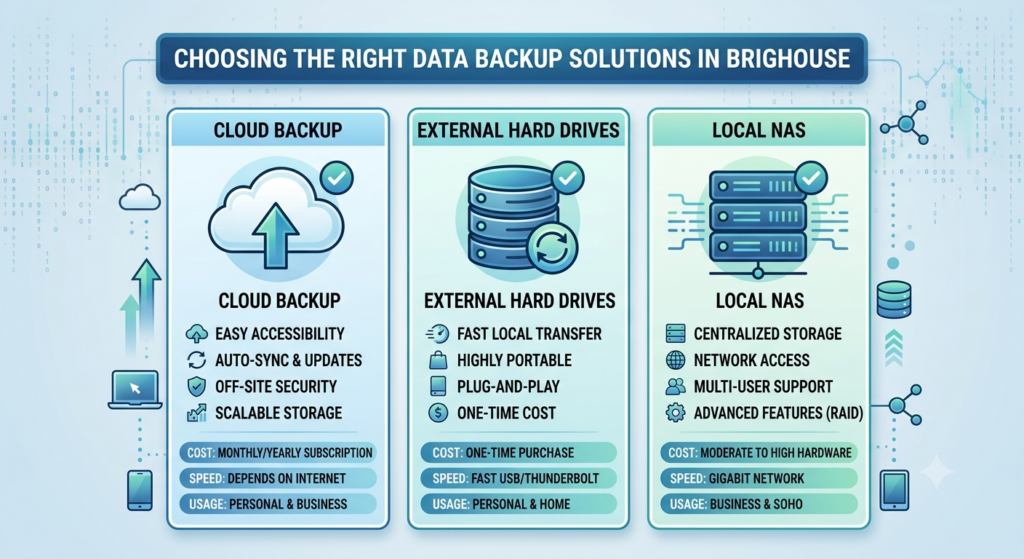
Choosing the Right Data Backup Solutions in Brighouse
Businesses in Brighouse, West Yorkshire, need backup arrangements that suit their operations, budgets, security requirements, and recovery expectations.
The right approach may combine local storage, cloud backups, and additional protection for critical systems.
Local Backup Solutions
Local backups store data on devices such as external drives, network-attached storage, or dedicated backup appliances.
They can offer fast recovery for large files and frequently used systems. However, local copies may remain vulnerable to theft, physical damage, and incidents affecting the entire premises.
Cloud Backup Services for Businesses
Cloud backups store copies of data in a remote environment. They can help businesses protect information against local disasters and provide additional flexibility for organisations with multiple locations or remote employees.
When choosing a provider, consider encryption, access controls, storage costs, retention periods, recovery speeds, and the ability to restore data securely.
Hybrid Backup Solutions
Hybrid backup solutions combine local and cloud-based backups. A business can use local storage for faster recovery while maintaining an additional off-site copy for protection against wider incidents.
This approach can provide a useful balance between recovery speed and data resilience, depending on how the system is configured.
Backup Solutions for SMEs
Small and medium-sized businesses often need practical protection without unnecessary complexity.
Suitable Backup Solutions for SMEs should reflect the amount of data stored, the importance of business applications, available budgets, and acceptable recovery times. Regular monitoring and restoration testing are also essential.
Brighouse Computer Centre can help businesses explore their IT requirements and consider suitable support options for their technology environment.
Business Data Backup and IT Disaster Recovery: What Is the Difference?
Although data backup and disaster recovery are closely related, they serve different purposes.
Business data backup Brighouse focuses on maintaining copies of files and information so they can be recovered after loss or damage.
IT disaster recovery focuses on restoring the technology, applications, infrastructure, and services required to resume business operations after a major incident.
A complete recovery plan should address both. Businesses should identify critical systems, establish recovery priorities, and decide how quickly essential services need to be restored.
For organisations in Brighouse, combining reliable backup practices with appropriate disaster recovery solutions brighouse for business can help improve preparedness and minimise operational disruption.
How Brighouse Computer Centre Can Help Protect Your Business Data
Choosing the right backup strategy involves more than simply copying files. Businesses need to consider backup frequency, storage locations, security controls, retention periods, and how quickly information must be restored.
Brighouse Computer Centre provides business IT services to help organisations manage their technology requirements. Businesses can discuss their needs and explore suitable IT support brighouse options for their environment.
Whether you need to review existing backups, consider IT backup solutions Brighouse, or plan a more resilient approach to business continuity, understanding your risks is an important first step.
A suitable backup strategy should include secure storage, controlled access, regular monitoring, and routine recovery testing. These measures can help your organisation prepare for unexpected data loss and reduce the potential impact on daily operations.
If your business is based in Brighouse or the surrounding West Yorkshire area, contact Brighouse Computer Centre to discuss your IT requirements and find out which support options may be appropriate for your organisation.
Final Thoughts
The 3-2-1 backup rule provides a straightforward foundation for protecting valuable business information. By maintaining three copies of your data, using two different storage types, and keeping one copy off-site, your organisation can reduce its exposure to common data-loss risks.
From Cloud backup services brighouse for business to hybrid backup solutions, the right approach depends on your data, security requirements, and recovery needs.
For businesses in Brighouse, West Yorkshire, combining a well-planned backup strategy with regular testing and documented recovery procedures can help improve resilience and protect essential information.
Frequently Asked Questions
Q1. What is the 3-2-1 backup rule?
A. The 3-2-1 backup rule means keeping three copies of your data, using two different storage types, and storing one copy off-site to reduce the risk of data loss.
Q2. Is cloud backup enough for a small business?
A. Cloud backup can provide valuable off-site protection, but businesses should also consider recovery speed, access security, retention policies, and whether an additional local backup is appropriate.
Q3. How often should a business back up its data?
A. Backup frequency depends on how often data changes and how much information the business can afford to lose. Critical systems may require continuous or frequent backups, while other files may need less frequent protection.
Q4. Can the 3-2-1 backup rule protect against ransomware?
A. It can improve ransomware resilience when backups are isolated, access-controlled, and protected from alteration or deletion. Regular restoration testing is essential to confirm that recovery is possible.
